Getting Started with Python
Python, what is it?
Python is a popular high-level programming language known for its simplicity and readability. It was created by Guido van Rossum and first released in 1991. Python is designed to emphasize code readability and productivity, making it an excellent choice for beginners and experienced programmers alike.
Some key features of Python include:
Easy-to-Read Syntax: Python uses indentation and whitespace to define code blocks, making it easy to understand and maintain. It has a clean and straightforward syntax, which reduces the complexity of writing and reading code.
General-Purpose Language: Python is a versatile language that can be used for various purposes, such as web development, scientific computing, data analysis, artificial intelligence, machine learning, and automation. It has a large standard library that provides numerous modules and functions for different tasks.
Cross-Platform Compatibility: Python is available for major operating systems like Windows, macOS, and Linux. It allows developers to write code once and run it on different platforms without significant modifications.
Large and Active Community: Python has a vibrant and supportive community of developers who contribute to its growth. This community actively develops libraries, frameworks, and tools, making it easier to solve complex problems and accelerate development.
Extensive Libraries and Frameworks: Python offers a vast ecosystem of libraries and frameworks, such as NumPy, Pandas, TensorFlow, Django, Flask, and more. These resources provide ready-to-use solutions for various tasks, simplifying development and reducing the time needed to build applications.
Interpretation and Interactivity: Python is an interpreted language, which means it does not require compilation before execution. This allows for faster development cycles as changes can be tested immediately. Python also provides interactive shells, such as the Python REPL (Read-Eval-Print Loop), enabling users to experiment with code and explore ideas interactively.
Open-Source and Free: Python is an open-source language released under the Python Software Foundation License. It is free to use, modify, and distribute, both for personal and commercial purposes.
Installation of Python
For Windows:
Go to this website: (python.org/downloads)
Click on Download, the latest version of python (3.11.1) below

Check on the downloaded amd64.exe file and check on the checkbox at the bottom which says
add Python 3.11 to PathComing to the optimal feature window select all checkboxes
Now on the Advance option window, select the first 4 or 5 checkboxes as per our need and click on Install.
Thus we successfully install Python on Windows.
Search for "Idle Python" on windows
Check the version on the cmd(command prompt) or PowerShell :
python --version
For Linux:
To install Python on Linux, We need to run the below commands
sudo apt-get update
sudo apt-get install python3
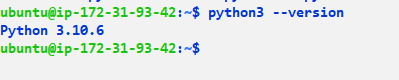
After installation to check the Python version need run the below command
python3 --version
Output:-
Data Types in Python:
Python has several built-in data types that are used to represent different kinds of values. Here are some of the commonly used data types in Python:
Numeric Types:
int: Represents integer values, such as 5, -10, or 1000.
float: Represents floating-point numbers with decimal places, such as 3.14 or -2.5.
complex: Represents complex numbers in the form of a + bj, where a and b are real numbers and j is the imaginary unit.
Boolean Type:
- bool: Represents a boolean value, which can be either True or False. Boolean values are often used for logical operations and conditions.
Sequence Types:
str: Represents a string of characters, such as "Hello, World!" or "Python".
list: Represents an ordered collection of items, enclosed in square brackets ([]). Lists can contain elements of different types and can be modified (mutable).
tuple: Represents an ordered collection of items, enclosed in parentheses (()). Tuples are similar to lists but are immutable, meaning they cannot be modified after creation.
Mapping Type:
- dict: Represents a collection of key-value pairs, enclosed in curly braces ({}). Each value in a dictionary is associated with a unique key. Dictionaries are mutable and allow efficient lookup and retrieval of values based on their keys.
Set Types:
set: Represents an unordered collection of unique elements, enclosed in curly braces ({}). Sets are useful for tasks like removing duplicates or testing membership. They are mutable.
frozenset: Similar to a set, but immutable. Once created, the elements in a frozenset cannot be modified.
None Type:
- None: Represents the absence of a value or a null value. It is often used to indicate the absence of a meaningful result or when a variable has not been assigned a value.


